
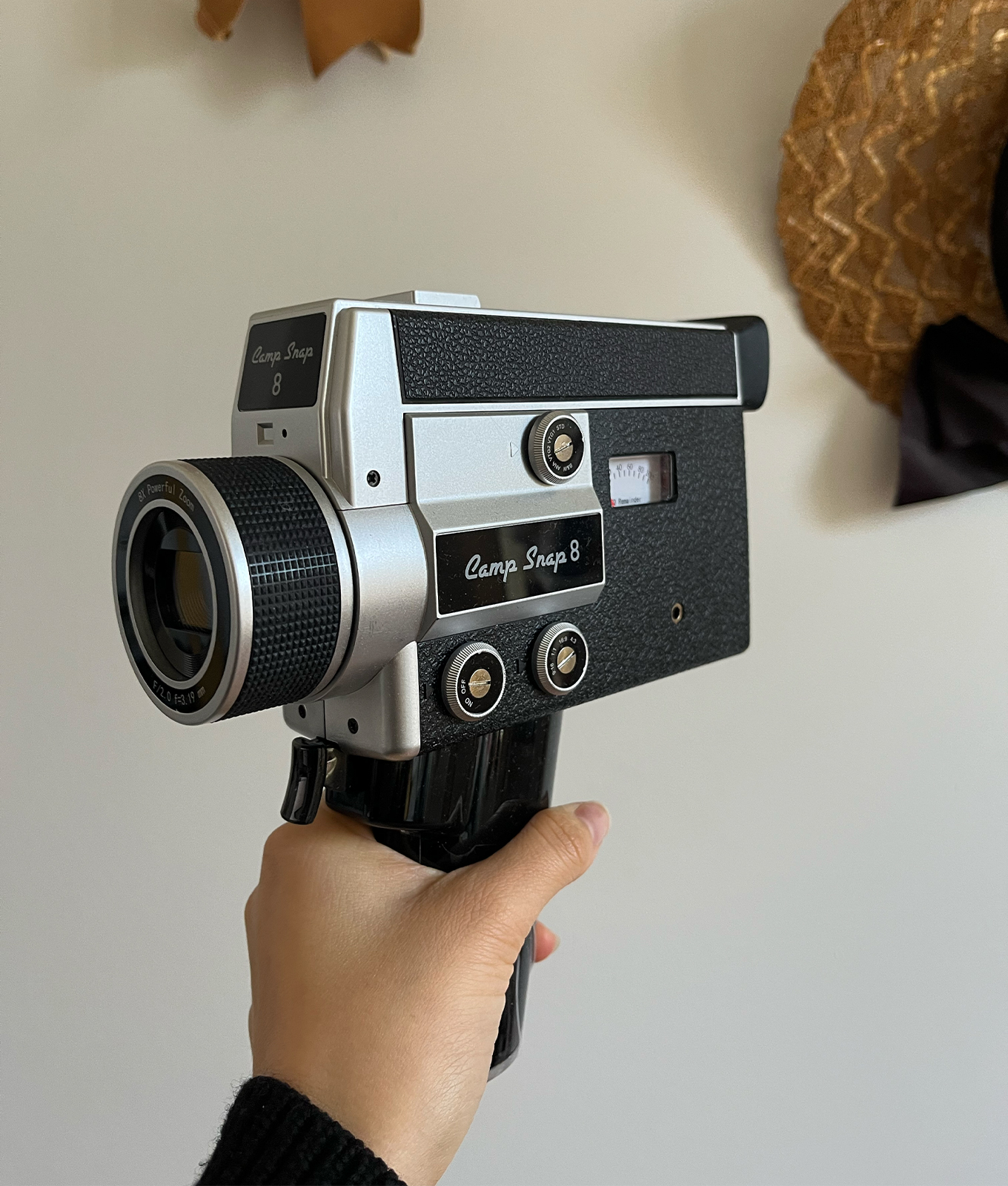
In a previous life, I was the editor at a photography magazine. The medium has fascinated me since high school, and I've now spent almost 15 years building my camera collection. My favorite form has always been analogue—I just need to say that I shot film before the girlies made it cool. I'm eagle-eyed about any new product in the analogue world...including digital dupes. So when I spied pop superstar Taylor Swift with this retro camcorder in her hands during a recent Chiefs game, I knew I was onto something. I quickly ID'd it as the Camp Snap CS8 camera ($199), which I'd been obsessing over for the past two months. Trust me when I say every Gen Zer wants this nostalgic little camcorder—it's going to be *the* gift of the year. I've been using mine obsessively since it launched. Here's the rundown.
Taylor Swift Was Spotted With This Retro Camcorder, and Trust Me, It's on Gen Z's Wishlist
Ready, set, action!

PureWow editors select every item that appears on this page, and some items may be gifted to us. Additionally, PureWow may earn compensation through affiliate links within the story. All prices are accurate upon date of publish. You can learn more about the affiliate process here.
What I Like
- film with press of the trigger
- intuitive
- lots of options for aspect ratio and vintage filters
- cold shoe can accommodate lights, mics and other accessories
What I Don't Like
- downloading and clearing the memory card is a clunky process
Camp Snap
Fast Facts
- Aspect Ratios: 4
- Filters: 5
- Audio Capture: yes
- Zoom: yes
- Memory Card Storage: 4GB (default), accomodates up to 128GB
- Cold Shoe: yes
Accessible Super 8
With her love of wax seals and festive music video that leaned heavily on old footage, Swift hardly surprised me by having the CS 8 in her hands.
The CS 8 mimics the experience of shooting Super 8, a dominant film format in the '60s, '70s and '80s targeting the home movie market. It's still popular today, if only for its aesthetic—Harry Styles' "Watermelon Sugar" music video famously recreated the vintage, grainy Super 8 look. The main problem with the film today is the cost. To buy, develop and digitize a reel of film (which amounts to maybe two or three minutes of raw footage), you're spending just shy of the cost of this digital iteration. That was a major pull for me. I've long wanted to shoot Super 8 but didn't want to sink Titanic money into it. This is a happy compromise.
Intuitive Operation Makes Filming Fun and Uncomplicated
To give you the Super 8 feel, this camcorder, despite digitally recording, has an analogue interface. There's no digital playback, and you control the five filters, four aspect ratios and power with three round dials. The battery life and memory card storage are measured in a meter with a dial indicating remaining capacity. To film, simply hold down on the trigger. As long as the trigger is depressed, you're recording. (This is also indicated by a red blinking light in the top left-hand corner of the screen.)
The four aspect ratios cater to most situations. There's 9:16 (reel), 16:9 (cinematic widescreen), 1:1 (square) and 4:3 (classic Super 8). There's a standard filter, two vintage ones, an "analogue" one complete with the Super 8 grain and black and white. My favorites have been the 9:16 and 4:3 ratios in black and white, analogue or the vintage filters. The standard one isn't anything special and just feels like a low-res video. Which, to be clear, all of the videos are. But 2k feels much more delightful when it also feels old.
Downloading & Memory Card Notes
The camera comes with a pre-installed 4GB memory card, which, in my experience, has been plenty. Granted, I take all footage off my camera at the end of a shooting day—the organizational process otherwise is horrific. However, it can be swapped with a memory card up to 128GB. My biggest gripe is that it's not easy to do so. You must undo the screws at the base of the handle, which gives you access to the card port. It's a bit of effort, so I haven't done it, but it can be done for those who are dedicated or want tons of storage.
When it comes to downloading, that process is breezy. The camera is compatible with any data-capable USB-C cable, and will pop up like a hard drive on your computer. You can also download to your phone. The camera's page has detailed instructions depending on your operating software. Do note that even if you delete the files after downloading, you may need to manually reformat the memory card. I've had files cache and take up space that wasn't cleared until I did a format to FAT32. This is accessed in Format (Windows) and Disk Utility (Mac).
The Bottom Line
I've never been a video person (especially not a digital one), but I loved the CS 8 so much I gave it precious bag space for my three-week trip home...and I'm a notoriously light packer. The camera is incredibly user-friendly, but also caters to more advanced creators with a cold shoe that can accommodate external lights and mics. Though, the raw sound captured isn't half bad for what it is. Overall, it's a fun way to get the retro feel of Super 8 without spending a small fortune every time you want to film. Plus, you're not at the mercy of poor lighting, as film is picky. Speaking on behalf of my nostalgia-obsessed generation, this is the one gift that is sure to be a hit.